
I'm a GTM engineer at a B2B SaaS company, which means I'm constantly working with third-party SaaS tools and their APIs.
The first thing I need before I can build anything is a complete list of the API endpoints that the SaaS tool exposes.
Why? 2 important reasons.
Execution. I have an automation or an agentic workflow in mind, and the endpoint inventory tells me whether it's actually feasible within the vendor's constraints. If it is, I can also see in advance where I'll need to work around endpoint restrictions instead of running into them mid-build.
Ideation. This is where I treat the LLM as a second brain. I give it the full list of API endpoints plus context on what I'm trying to achieve, and we brainstorm back and forth on what's potentially worth building. The LLM is good at lateral ideas that I wouldn't have made on my own.
Different types of API discovery
Layer 1: MCP + Web Scrape (Least Efficient)
The fastest way to get an endpoint list is to call the tool’s MCP server directly and ask it to return all the exposed endpoints. It’s quick, it’s efficient, and they’re already surfaced in my Claude Code context, so I can just call them.
The downside is that some MCP servers don’t expose the full API. There’s a real gap between what’s in the tool’s public API docs and what’s exposed through the MCP.
For some third-party SaaS tools, their MCP only gives me 60-70% of what the underlying REST API can actually do.
When the MCP isn’t enough, I usually have to fall back to scraping the tool’s API docs site. It’s slow, it’s inconsistent, and JavaScript-rendered pages make extraction very unreliable.
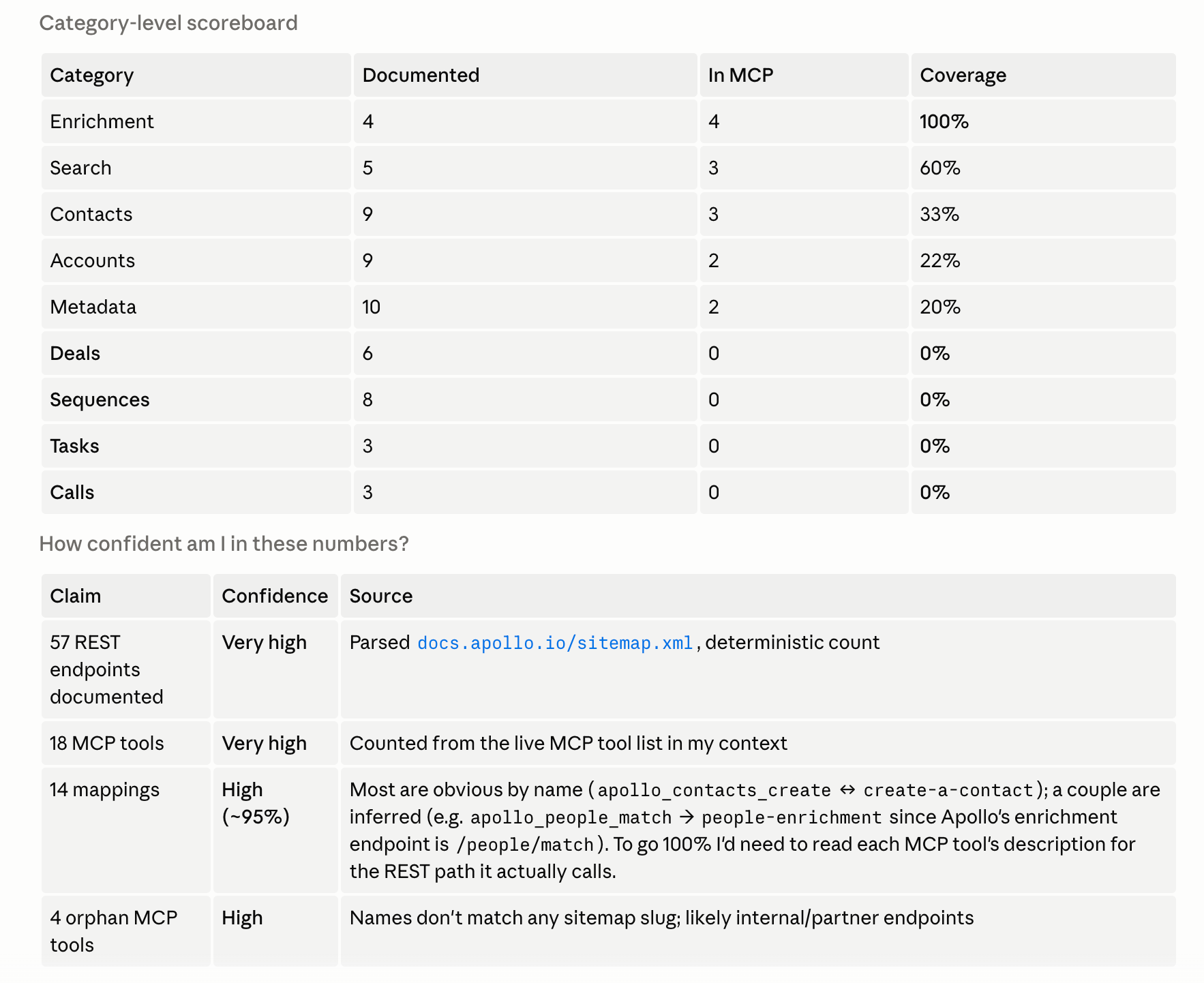
Case study: Apollo
MCP covers 24% of Apollo's public REST API
No llms.txt or OpenAPI.json (which I’d cover more below)
API data parsed from https://docs.apollo.io/sitemap.xml
Layer 2: llms.txt
llms.txt is a newer convention (proposed in 2024) where companies publish a markdown index of their website content, formatted specifically for LLMs and AI agents to navigate.
It’s not made for documenting API end points specific. It’s more of a site-wide directory of linked pages, organized by category, with a one-liner for each. Examples include product docs, guides, reference material, blog posts & more.
The reason I check it for API discovery: llms.txt is often where the OpenAPI spec link is buried. The endpoints themselves aren’t in llms.txt, but the breadcrumb to the file that contains them often is.
Case study: Instantly
With Instantly, I checked https://developer.instantly.ai/llms.txt.
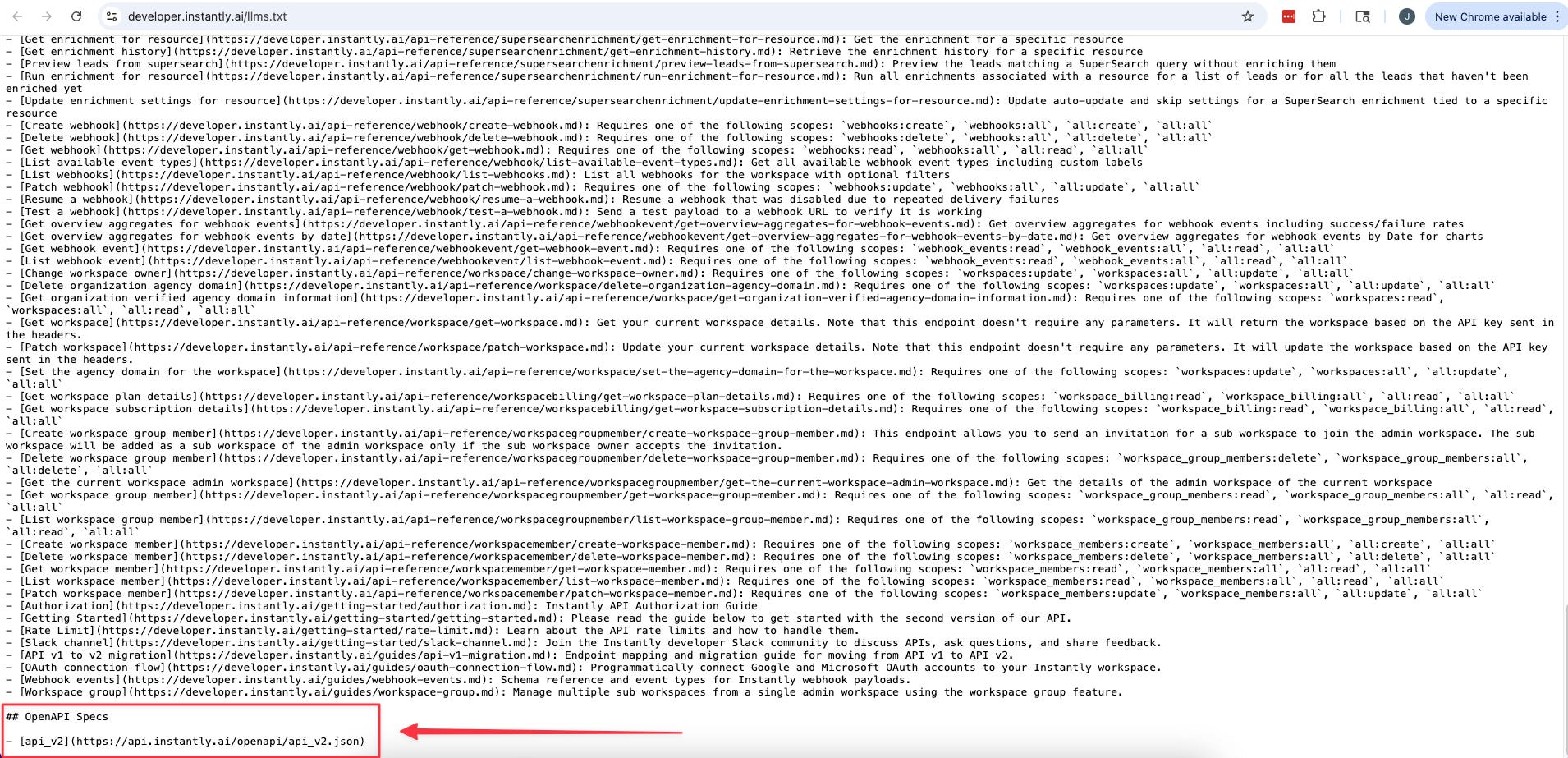
It’s an index of their docs built for LLMs, and one of the links inside pointed to their OpenAPI spec (which I’ll cover more below) at https://api.instantly.ai/openapi/api_v2.json. That file had every endpoint Instantly exposes.
If I’d stopped at the MCP, I would have missed all of them.
Layer 3: OpenAPI.json (Most Efficent)
The OpenAPI spec is a single machine-readable file (JSON or YAML) that describes every endpoint of a REST API in one place. Paths, parameters, request bodies, response shapes, auth methods. All of it, in one structured file.
This is the gold standard for API discovery for two reasons.
Completeness. The spec is the API. It’s not a curated subset like the MCP, and it’s not a doc page that might be out of date. If an endpoint exists in the spec, it exists in the API.
Accuracy. Mmost modern SaaS auto-generates this file directly from their API code. It stays in sync with reality without anyone manually updating it. Whatever I read in the spec is what the API actually does today.
The catch is that there’s no single conventional path where the spec lives.
Additional notes:
When verifying an OpenAPI spec, use a deterministic script (Python or shell) instead of asking the LLM to WebFetch the URL. The script downloads the full spec to a temp file and counts how many endpoint paths are in it.
WebFetch is non-deterministic. The LLM might miscount, skip sections, or summarize away detail.
General pattern: when the task is structured data extraction (counting, listing, filtering JSON), use a script. Save the LLM for tasks that actually need reasoning.

Case study: DiscoLike
DiscoLike was the cleanest version of this.
The OpenAPI spec lives at https://api.discolike.com/v1/openapi.json, which is the conventional path. The DiscoLike MCP exposes 29 tools.
The spec shows 9 more more user-facing data endpoints that aren’t in the MCP (corporate hierarchies, vendor relationships, SSL cert history & others).
Save API endpoints once, reference them on demand
Once I have the endpoint inventory for a tool, I save it locally so I’m not re-pulling them from the source every time I want to reference it.
Just a word of caustion though. Don’t dump all of your API endpoints in your CLAUDE.md file.
CLAUDE.md is always-loaded context, so dumping 130+ Emailbison endpoints plus 60 DiscoLike endpoints plus 200+ Instantly endpoints in there burns through my context budget on every conversation, even when the work has nothing to do with those tools.
Instead, save each tool to its own file under .claude/mcp-end-points/. One file per tool. CLAUDE.md just has a one-line bullet pointing to each reference and they stay out of the context window until I tell Claude to read them.
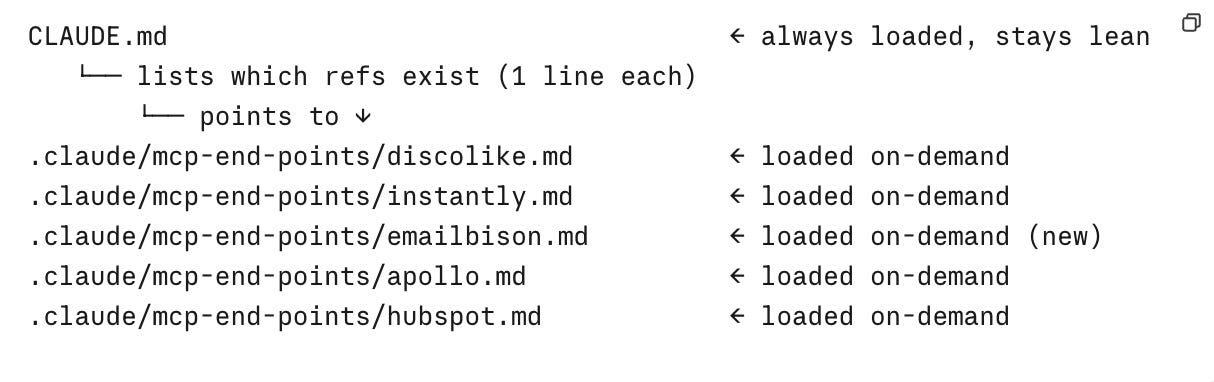
Each reference file has two sections:
The endpoint catalog
Run learnings from actual usage which usually include rate limits, validation quirks, parameter naming traps. These are added in on demand.
Updating API endpoints via a hook
A point to note, APIs aren’t static. Your Saas tools could add new endpoints, deprecate old ones, or change parameter names. The reference file I saved last month isn’t guaranteed to reflect what the API does today.
The way I handle this is to create a Claude Code hook that points back to the tool’s OpenAPI spec URL. Once a month, it re-pulls the spec, regenerates the endpoint catalog section, and overwrites the file.
Composio is another option I want to test.
From my understanding of what they do. they maintain integrations for a lot of the major tools and handle the API updates on their side, so the refresh happens upstream rather than in my own setup. Haven’t tried it yet, but if it works the way I think it does, it removes the hook maintenance entirely.