
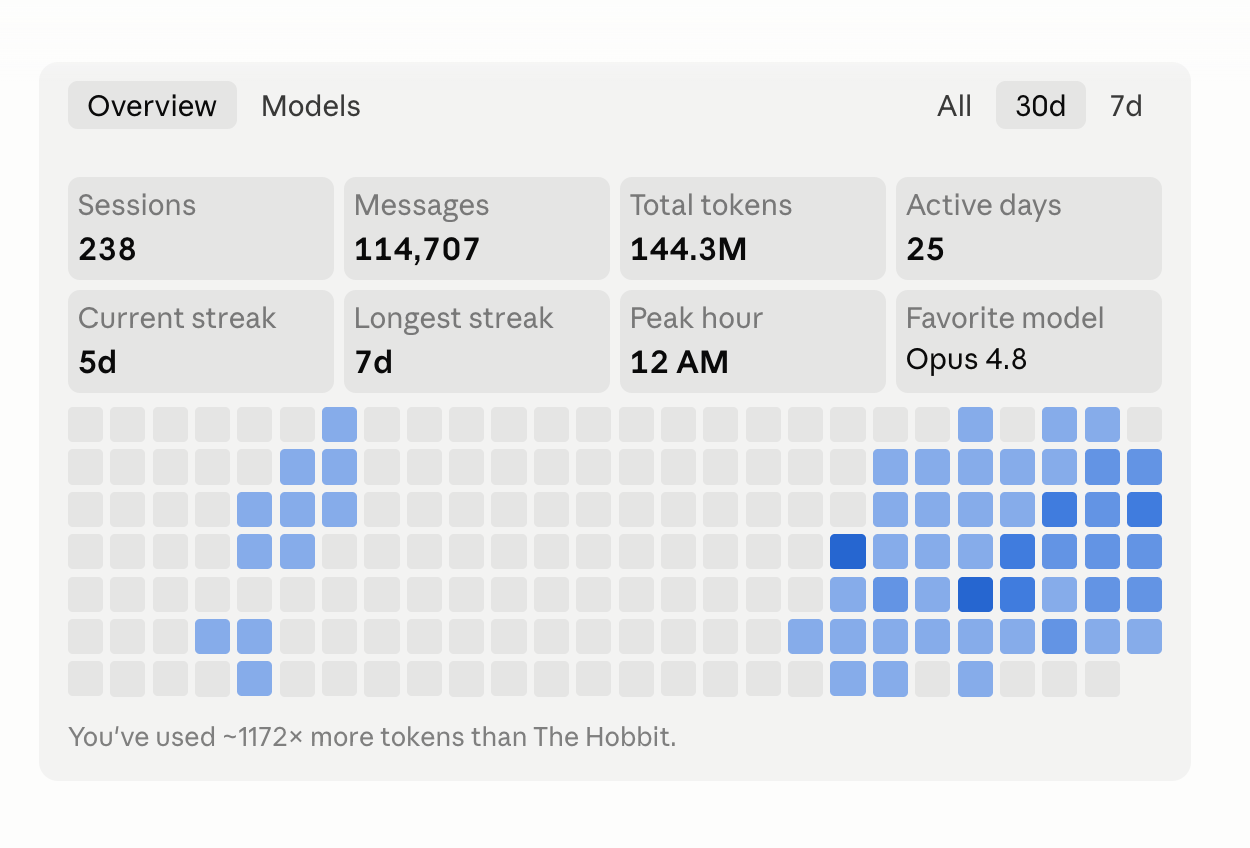
I have been using Claude Code heavily for the past 30 days to build marketing systems at my day job (I work at Riverside as a GTM engineer). Some stats from within my Claude Code itself:
238 sessions
114,707 messages
144.3 million tokens
Of which, most of my sessions are split between two main activities:
Building agentic workflows
Running agentic workflows
So I just wanted to come up with this article to document 17 of the key learnings that I had.
#1: Agentic workflows > AI agents
It took me a while to properly understand the difference between the two, so let me explain that first.
Agentic workflow: you give it a predefined series of steps, with some steps having an LLM attached to them. The workflow runs from step 1 to step 10 deterministically.
AI agent: you give it an outcome, and the agent decides what steps to take to achieve that outcome.
The main reason why I think agentic workflows are better than AI agents is repeatability of results. This matters in my line of work. I need to know that when I input X, an output Y comes out, and that this Y has gone through the same series of steps every single time.
So most of my agentic workflows are pretty much pipelines, like a factory: numbered steps all the way to the final outcome. The AI works inside some of the steps, and within a step it can have full autonomy to decide the sub-steps needed to get the result.
But it never decides which step runs next. The code enforces the sequence.
The other benefit with an agentic workflow? Whenever I audit back an output, I can know exactly which steps every single record went through. This helps to easily diagnose which step of the workflow led to the error.
#2: Log everything, especially outputs
Whenever you are running agentic workflows, observability (the ability to see exactly what your workflow did at every step) becomes crucial.
2 main reasons:
It is what allows you to debug a workflow
You are able continue one after a unexpected crash (think rate limitations etc).
So every agentic run gets its own dated folder, and every step of the workflow writes a numbered file: 01_raw.json, 02_filtered.json, 03_enriched.json. When a run crashes at step 9, I can safely resume at step 9 instead of restarting from zero.
Debugging is where this pays off the most. Let’s say a workflow has been running for seven days, and on day seven you discover a bug. You now need to trace when this bug first appeared. Because every output and intermediate step of each workflow is logged, you can easily trace which run, and which step of that run, had the buggy intermediate output and fix it.
#3: Deterministic scripts
Deterministic scripts are code-based checkpoints in your workflow. They make sure each step fulfils a set of criteria before the workflow is allowed to proceed to the next step.
I run three kinds of checkpoints:
Order: before a step runs, verify the previous step completed properly. Every step writes a small receipt when it finishes (step name, timestamp, a hash of its output file), and the next step refuses to start without it.
Completeness: before any data gets pushed to an external system, verify the required fields exist and are actually filled. This one came from a painful lesson: my earlier checkpoints confirmed the columns existed, but never checked that the values inside existed. Four fields went out empty for 16 straight batches and nothing complained. Now, if a required column is empty across the batch, the push refuses to run.
Observability: every run logs one line of stats (counts, rates, dates) to a single file, and a script compares them across runs. If a number spikes, or freezes when it should be moving, it gets flagged.
The intention here is that the AI does the work inside the steps, but it never gets to decide whether the work was good enough to continue.
The deterministic scripts ensure that instead.
#4: Cheap vs expensive models
As you build and run more agentic workflows, token optimisation becomes an important consideration. From my experience, choosing the wrong model for the wrong task can burn through your whole five-hour usage window.
As a general guide:
Main agent: always use a higher reasoning model, like Opus 4.8.
Sub agents: use the lower reasoning models, like Haiku and Sonnet.
From a task perspective, you can of course use an LLM to decide which model to use for which task. But as a general rule of thumb: complex tasks that need more thinking and judgment always go to a higher reasoning model. Non-complex tasks like summarisation and categorisation can go to a lower reasoning model like Haiku or Sonnet.
With these two in mind, structure your agentic workflow such that it uses different models at different steps. This helps to extended your Claude subscription, or reduce the amount you are paying for the API.
#5: The VC subsidy is real
I did an interesting experiment recently: I prompted Claude Code to calculate how much I would actually be paying in API costs if I was not on the Claude Code Max 20x subscription (US$200 a month).
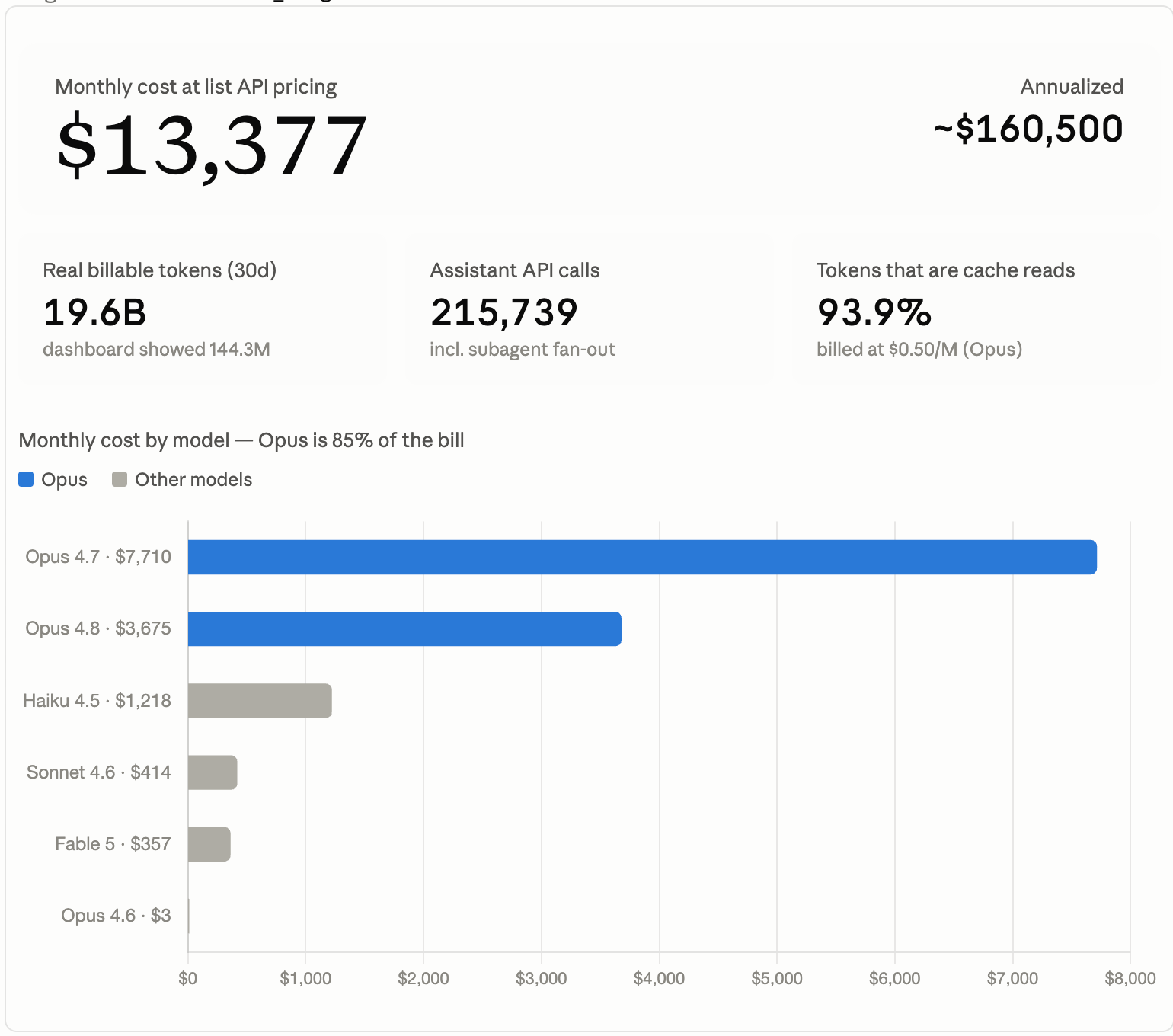
The result was quite shocking. Claude came back with US$13,677.
So the subsidy I am effectively getting is around 98 to 99 percent. Two takeaways with this in mind:
Build aggressively while this window is open. Make use of this golden window to explore, build, and go in depth on agentic coding and vibe coding.
Plan for the future as well. When the VC subsidy starts to reduce, that is where you look into going more towards open source models, or local models hosted on your own computer.
#6: Parallel sessions are king
Working in Claude Code has taught me some software engineering basics, and one of them is the concept of parallel sessions. I have been using them more and more over the past 30 days, and it has been a very big unlock in terms of productivity.
The old process (not good!)
I would work on one workflow, wait for the session to finish writing code, debugging, or getting back to me with insights, then go back and forth until it was done. This is rather inefficient, because every wait means one to five minutes of downtime.
The new process.
I build and run five to six workflows of varying nature in parallel. When there is downtime on one workflow, I just go into the next one. You are essentially parallelising your work and your thought process across five to six sessions, which helps you build and produce five to six times faster.
#7: Long running loops
Another productivity change that happened recently with Claude Code: you can now remove the AI from orchestrating your workflows, and move the orchestration into a deterministic script instead. What this means is that you can run loops across huge databases for hours, without the risk of the AI hallucinating (IE skipping steps or missing steps midway).
I have tried this with a few workflows now. One of them was a deep research across 15,000 companies: I set it to run at 12am, and by the time I woke up the next day, everything was complete.
Before I let any loop run long, there are three things I always put in place:
Break the loop into smaller batches (batches of 10 or 20) and save the progress after every batch. This is important because if your loop dies midway, you are able to rerun from the latest batch.
Retry on rate limits. If an API rate-limits the loop, it retries on its own: starting with a short wait, extending the wait each time, and giving up after the fifth retry.
Log any failed attempts, so I can always go back and investigate them.
#8: API > MCP
If you are first starting out, MCP is a great way to get started. It is fast, quick, and easy to set up.
But as you progress, you will outgrow MCP very quickly.
The reason why I prefer working with API access over MCP access:
Latency. MCP comes with a lot of built-in latency. If you are doing massive agentic operations, all of this adds up in runtime, and it compounds.
Control over the data output. With MCP, you cannot control the data coming out of it. You could have huge datasets getting pushed into your context window when all you actually need is one or two lines. With API access, you control exactly that.
In general: API > MCP, because of latency and greater flexibility in controlling the data output.
#9: Think modularity / reusable components
As you build more and more agentic workflows, AI agents and skills, you start to notice that there are reusable components across all these independent small projects.
I now build on a modular basis, breaking everything down into small discrete steps. The intention is that whatever gets built in these small steps can always be reused in bigger components later, so I never have to redo everything from scratch.
One good example.
Whenever I am doing cold outreach, I always have to check that the person I am reaching out to is not currently within our HubSpot CRM. That check comes with a lot of intricacies. Domain matching alone taught me that the CONTAINS operator behaves very differently from the IN operator. A company can also exist in the CRM but have no BD owner attached, which means it is actually still safe to outreach. And so on and so forth.
So that whole net-new check within HubSpot became a modular component, and now it gets reused in every subsequent agentic workflow I build.
#10: Plan your day (work day = build, night time = let workflows run)
This one is more of a personal work optimisation.
I typically split my day into two. Daytime is for building, with me in the loop.
At night, the laptop stays on and the workflows run without me. New raw data gets pushed into the workflows every night, and they run through it and spit out processed data.
#11: Remove GUI from your everyday work
If you are a marketer, you would probably agree with me: most of our work lives inside SaaS platforms. Google Ads, Facebook Ads, Monday.com, Salesforce, HubSpot. These are platforms we heavily depend on in our line of work.
The old process was that I would go into each of these platforms to get my work done for the day, clicking 10, 20, sometimes even 30 steps just to get the outcome I wanted. Really time consuming.
I removed GUI from my everyday work (almost), and now I work purely off the Claude Code terminal using direct API access. I no longer go through all those clicks. I get the same output with one typed command, and it saves me so much time.
#12: Build small automations to compound efficiency
I’m a big advocate of small automations, and I think they are very understated and underappreciated.
Going back to #11 (remove GUI): once you have worked exclusively from API and CLI access, you start to map out certain repetitive tasks that you are always doing, and you can create small scripts that handle these repetitive tasks within Claude Code itself. These can take the form of Claude Code skills, AI agents, or small agentic workflows.
Here are two of mine that I recently did up:
A scheduled script that pauses all my email sending on every US federal holiday, and every December it refreshes itself with next year’s dates.
A script that checks my 1,000+ sending domains against blacklists every Monday morning, and swaps out any domain that got flagged.
The net result is that your efficiency gets compounded quickly. You start to find that certain work gets finished so much quicker, and that gives you more time to think about deeper marketing problems to solve.
#13: Agent harness is important
There has been a lot of hype around agent harnesses recently, and for the most part I agree with it. An agent harness is essentially the set of constraints you give your agents, so that whenever they are running, they stay within those constraints.
In practice, my harnesses cover three things in my agentic workflows:
What the scripts can and cannot do. Can it push this data, or can it not? What is allowed is decided upfront in code, and the agent stays within it.
What tools each step gets access to. At this specific step of the workflow, does the agent get Apollo? Does it get HubSpot? Each step only gets the tools it actually needs.
Sub agents. When to run sub agents, and which model each sub agent uses.
So in short, having the agent harness helps to constrain the scope of your AI agents and your agentic workflows, such that they don’t drift too much from your intended objective.
#14: Sub agents = good for parallel tasks, but careful with the models
The main advantage of sub agents is that they are super good at parallelising a task. Instead of waiting for your main agent to finish the task line by line, you can spawn out a team of 50 to 100 sub agents that parallelise the task, consolidate the results, and feed them back to the main agent.
One example: classifying job titles into buckets (marketing, L&D, founder), with over 10,000 job titles to classify. Without sub agents, your main agent has to go through each and every job title one by one. A very slow process. With sub agents, you can spawn out 200 sub agents to classify 200 job titles simultaneously. This parallelisation helps to cut down the workflow runtime.
The one thing to be mindful of: sub agents feed off the main agent’s model. If your main agent is on Opus 4.8, your sub agents by default will be running Opus 4.8 as well, and that can consume a lot of tokens very quickly. So always choose the right model for your sub agents based on the task at hand.
#15: Claude remote control: 10/10
I really like this feature. To me, it is one of the best features Claude Code has launched in 2026.
With remote control, you are able to port all your Claude Code sessions over to the Claude app on your phone. This is especially useful when I am away from my computer and need to check how a workflow build is going, and whether it needs the next command from me.
This has turned my non-productive, out-of-office time into productive building time.
#16: Memory (Claude memory, project memory, step memory)
My memory lives in three different layers:
Global memory: my claude.md file. General rules that apply to every Claude Code session I run. Short and sweet, less than 50 lines.
Project memory: each agentic workflow has its own project memory, where I save the goal, the current status, and the list of individual steps. This only gets loaded when the project runs.
Step memory: within a project, each deterministic step has its own specific instructions. How the step gets triggered, what to do within the step itself, and so on and so forth.
By structuring memory this way, you prevent a lot of unnecessary memory from leaking into your context window.
#17: Regex first, LLM only for the leftovers
You will notice that most decisions within an agentic workflow do not actually need intelligence. Very simple rules and regex can resolve 90% of the cases instantly, deterministically, and for free. This saves alot of compute time and token cost.
My agentic workflows typically run as a cascade:
Use deterministic rules first (regex).
Map out which cases are the “unsure” leftovers.
Run the unsures through an LLM to get the final judgment on anything genuinely ambiguous.
Final Thoughts
If I had to sum up the bulk of my learnings from going deep into building agentic workflows and AI agents over the past 30 days, it would be that they are very much architecture focused.
Your agents can only run as well as you design them to. That is where having a good set of architecture in place helps: the deterministic steps, the checkpoints, the memory layers, the harness, the small automations. Almost every lesson on this list is an architecture decision.